
Building E-Commerce Storefronts with Next.js
This article was updated for Next.js 16.
Avoury was my first e-commerce project with Next.js. "Avoury. The Tea" - a Melitta brand selling tea machines online. That was 2018, Next.js version 7. Looking back, I can't believe Next.js didn't even have native TypeScript support yet, and we had to use @zeit/next-typescript. The storefront was connected to Salesforce Commerce through their Open Commerce API (OCAPI). The product was innovative - a new kind of tea machine - so the storefront had to match: strong visuals, horizontal scrolling navigation through tea varieties, an experience that felt more like an editorial product than a checkout funnel.

That was seven years ago. Since then, I've shipped more than a handful of enterprise e-commerce projects with Next.js - and the framework has changed as much as the expectations around what a storefront should be.
What makes storefronts different
A storefront is not a typical web app. A SaaS dashboard can get away with a loading spinner (or better: a skeleton element) on initial render. A blog is mostly static content. But an e-commerce storefront has to do everything at once.
Product catalogs with tens of thousands of pages need to load fast and rank well. Prices and availability can change by the second on Black Friday. Personalized product recommendations need to render without slowing down the rest of the page. And I know marketing likes to run one or another A/B test on top of all that.
These aren't just technical requirements - they translate directly to revenue. Akamai found that a 100-millisecond delay in load time can reduce conversions by up to 7%. The old Amazon figure - every 100ms costs 1% of revenue - still holds. Cloudflare reports 47% of customers expect a page to load in under two seconds. Attention spans are shrinking, and users are increasingly used to instant results on screen.
And then there's search. Google uses Core Web Vitals not only to measure user experience, but also as a ranking signal - and in e-commerce, ranking is revenue. A storefront that scores poorly on LCP (Largest Contentful Paint) or CLS (Cumulative Layout Shift) doesn't just feel slow - it shows up lower in search results. Fewer visitors, fewer sales.
Composable by design
One thing I appreciate about Next.js for e-commerce: it has no opinion on where your data comes from.
It doesn't matter if you're calling Shopify's GraphQL API or working with commercetools' extensive REST API (the swagger file is over 89,000 lines). You can pull product data from an ORM (Object-Relational Mapping - think Prisma or Drizzle), a CMS (Content Management System) for editorial content, a PIM (Product Information Management) system for structured product data, or all of them at once. Next.js gives you the fetch API, direct database access through Server Components, SDKs - whatever fits your commerce stack.
This matters because enterprise e-commerce is rarely one system. It's a commerce backend, a CMS for editorial pages, a PIM for product data, a search provider, a payment gateway. Next.js does not force these into a specific pattern. You compose your own setup, tailored to what the business actually needs.
The trade-off is real, though. Every part of the shop - payment, checkout, authentication, search - needs to be implemented in your frontend. There is no out-of-the-box admin panel. That takes more effort upfront but gives you full control over the experience.
Static generation for large catalogs
When you have tens of thousands of product pages that live on a dynamic page segment, you do not want to build all of them on every deploy upfront. Next.js provides a solution for this within generateStaticParams.
The approach: return an empty array from generateStaticParams. No paths are pre-rendered at build time. Instead, each product page gets statically rendered the first time a user visits it - and cached for subsequent requests. Creating or updating static pages after the site has built is called Incremental Static Regeneration (ISR).
export async function generateStaticParams() {
  return []
}
From the Next.js docs: you must always return an array from generateStaticParams, even if it's empty. Otherwise, the route will be dynamically rendered on every request. I fell for this one in the beginning too - it's a subtle but important distinction.

Images
Product photography is heavy. High-resolution shots from multiple angles, lifestyle images, zoom-ready detail views - a single product page can easily serve a dozen images. Without optimization, that's where most of the page weight comes from.
next/image handles the heavy lifting: automatic format conversion to WebP and AVIF, responsive srcset generation, lazy loading below the fold, and proper width/height attributes that prevent layout shift.
For a deep dive on how next/image works under the hood - including format negotiation, the optimization pipeline, and what to watch out for - I wrote a separate article on Next.js Image Optimization.
Caching
Caching in Next.js has a complicated history. In previous versions, caching was pretty opinionated - fetch results were cached unless you opted out. After widespread frustration from developers who kept getting stale data in unexpected places, the team reversed course. Since Next.js 15, caching is opt-in. You choose what gets cached and for how long.
The shift was necessary, but it also means teams who went through the transition had to relearn caching patterns with each major version. If caching in Next.js has confused you at some point, there's a good reason for that.
What makes it especially tricky in e-commerce is that a single page contains content with completely different lifetimes. The product description hasn't changed in months. The price updated an hour ago. Stock availability shifts by the minute. And the cart is unique to each user. Getting the caching strategy right for all of these on the same page is where most of the complexity lives.
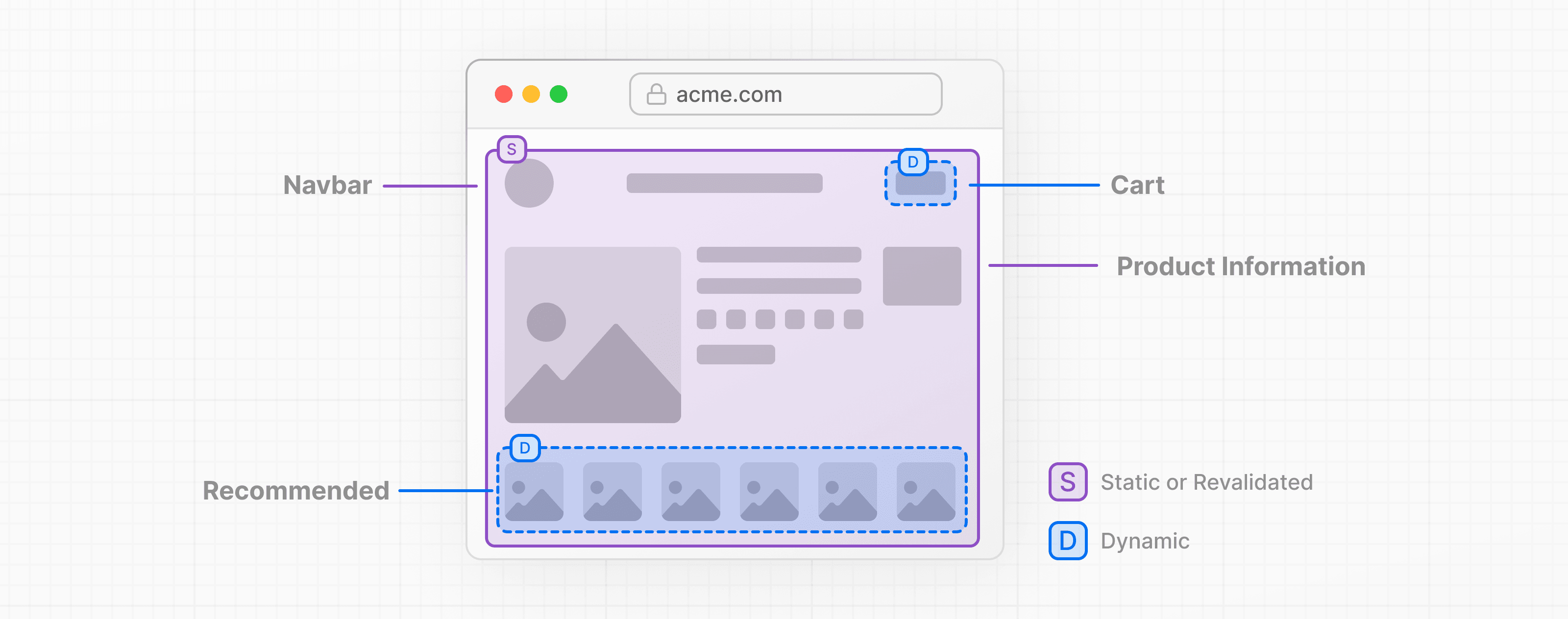
The 'use cache' directive (introduced as experiment in Next.js 15 and made stable in Next.js 16) gives you function-level control over this. Here's a simplified example for a product data function:
import { cacheTag } from 'next/cache'

async function getProduct(id: string) {
  'use cache'
  cacheTag(`product-${id}`)
  // fetch from commerce backend
}
When a product gets updated in your commerce backend, you can invalidate that specific cache entry. Next.js gives you two options here, and the distinction matters.
Use revalidateTag when updates don't need to be reflected immediately - it serves the cached version while fetching fresh data in the background (stale-while-revalidate):
'use server'
import { revalidateTag } from 'next/cache'

export async function onProductUpdate(productId: string) {
  revalidateTag(`product-${productId}`, 'max')
}
Use updateTag in Server Actions when you need immediate consistency - for example, when a user updates their cart and the UI needs to reflect the change right away:
'use server'
import { updateTag } from 'next/cache'

export async function addToCart(itemId: string) {
  // write to cart
  updateTag('cart')
}
updateTag can only be called from Server Actions. It immediately expires the cache, and the next request blocks until fresh data is available. This is the "read-your-own-writes" pattern - when users make changes, they see them instantly.
This is useful when your cached function needs access to request-specific APIs like cookies() or headers() - things that the standard 'use cache' directive does not allow. A cart function, for instance, needs to read a cookie to know which user's cart to fetch:
import { cacheTag } from 'next/cache'
import { cookies } from 'next/headers'

async function getCart() {
  'use cache: private'
  cacheTag('cart')
  const cartId = (await cookies()).get('cart-id')?.value
  // fetch cart for this session
}
You might have noticed the 'use cache: private' directive hasn't come up yet. This is for content that depends on the individual user - like a cart or personalized product recommendations. Private cache results are cached only in the browser's memory and never stored on the server. The cached response is scoped to the individual user and never served to anyone else.
From 2018 to now
Next.js has come a long way since that Avoury project. The patterns we had to build ourselves back then - deciding what's static vs. dynamic, managing server-rendered content alongside client-side interactivity, handling cache invalidation - these are now first-class framework features. Server Components eliminated the need for client-side API calls for most product data. Streaming lets you send dynamic parts of a page. The 'use cache' directive gives you per-function cache control. The developer experience has improved significantly so we all can ship faster.